So you’re sitting in your local café, laptop open, and you connect to the free Wi-Fi. No password. No fuss. Job done. But underneath that seamless experience, someone (maybe someone like you) could historically be passively sniffing every single unencrypted byte you’re sending over the air.
That’s the problem OWE was designed to fix. Let’s dig into what it is, how it actually works, where it shines, where it falls flat, and most importantly for those of you levelling up your wireless skills, what it means for your next engagement.
What Is OWE?
OWE stands for Opportunistic Wireless Encryption. It’s defined in RFC 8110, incorporated into the IEEE 802.11 standard, and marketed by the Wi-Fi Alliance under the friendlier name Enhanced Open. It became part of the broader WPA3 specification.
The goal? Replace traditional open (completely unencrypted) Wi-Fi with something that gives you encryption in transit without requiring a password. That last part is the clever bit. OWE gives you the encryption benefit of WPA2 with none of the friction of managing a shared passphrase on a public network.
How Does It Actually Work?
Here’s where it gets interesting. If you’ve been through the 4-way handshake enough times to draw it from memory, you’re already halfway there, because OWE builds on that same process. It just changes how the Pairwise Master Key (PMK) is derived.
With a standard open network, there’s no PMK at all. The 4-way handshake never happens. Traffic hits the air in plaintext. Anyone with a wireless adapter in monitor mode and Wireshark running can read it. Full stop.
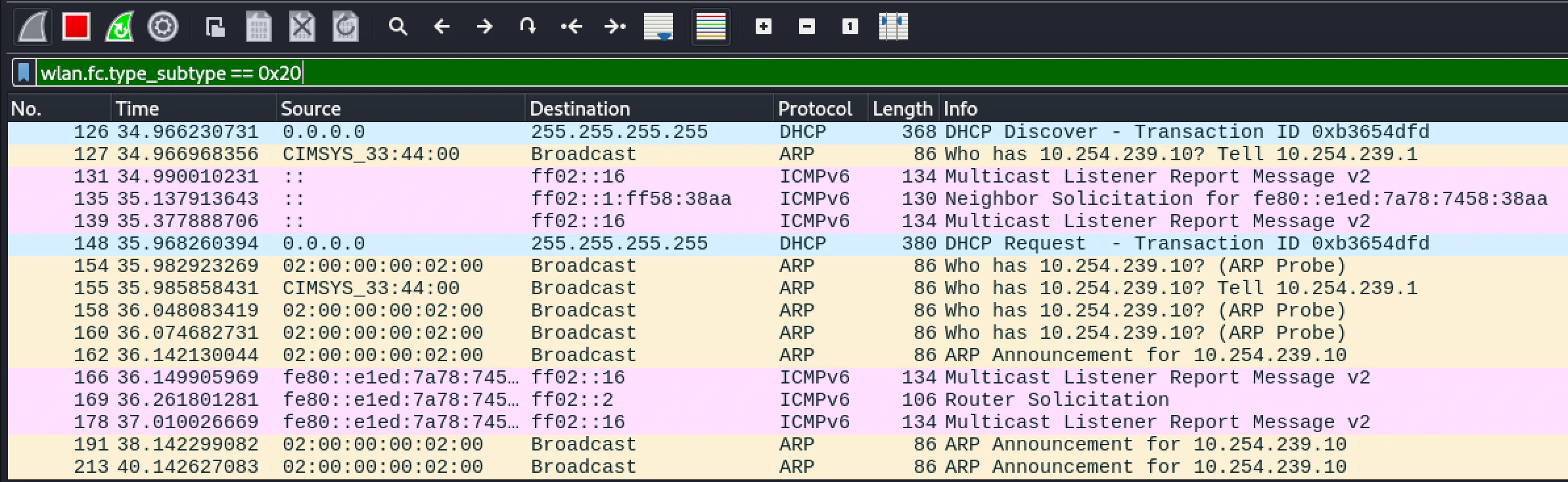 On a traditional open network, data frames hit the air with no encryption. Anyone in range can read them.
With OWE, during the 802.11 association phase, the client and the access point perform a Diffie-Hellman (DH) key exchange, by default using NIST P-256 (Group 19, elliptic curve). Both sides generate a public/private key pair on the fly, exchange their public keys, and independently compute a shared secret. That secret derives the PMK. From there, the standard 4-way handshake runs exactly as you know it, producing a PTK (Pairwise Transient Key) unique to that session.
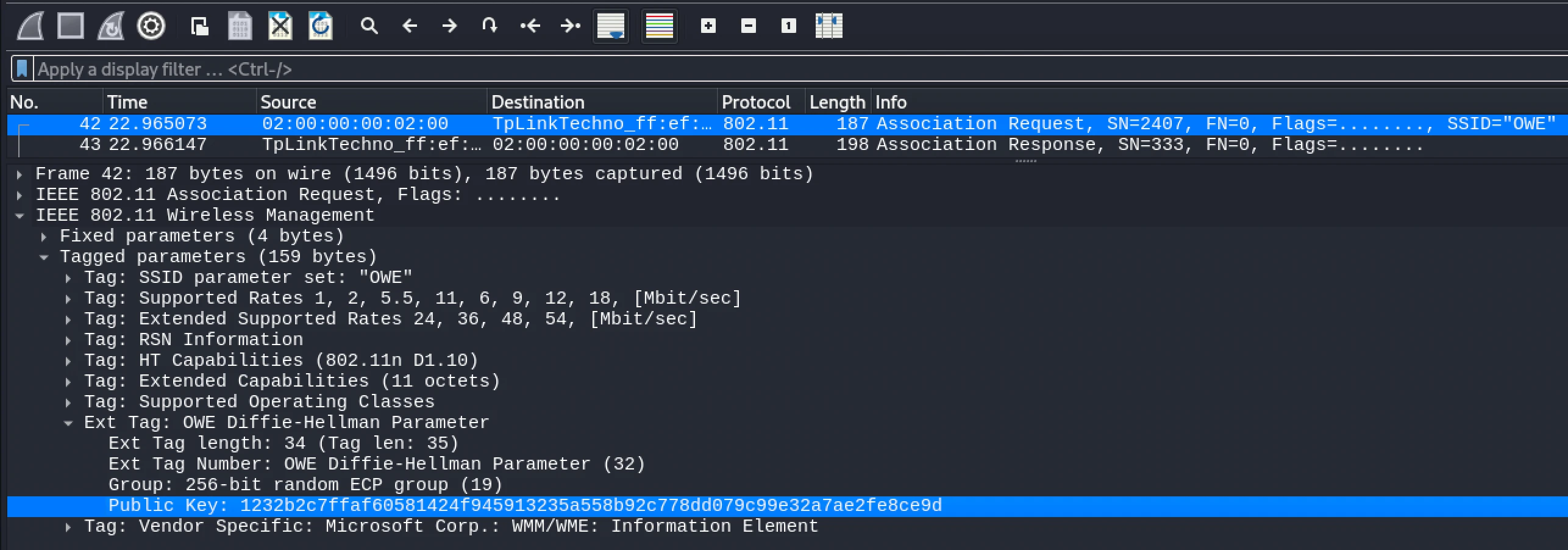 An OWE Association Request frame. The Diffie-Hellman Parameter element is embedded in the tagged parameters, carrying the client’s public key as part of the standard association process.
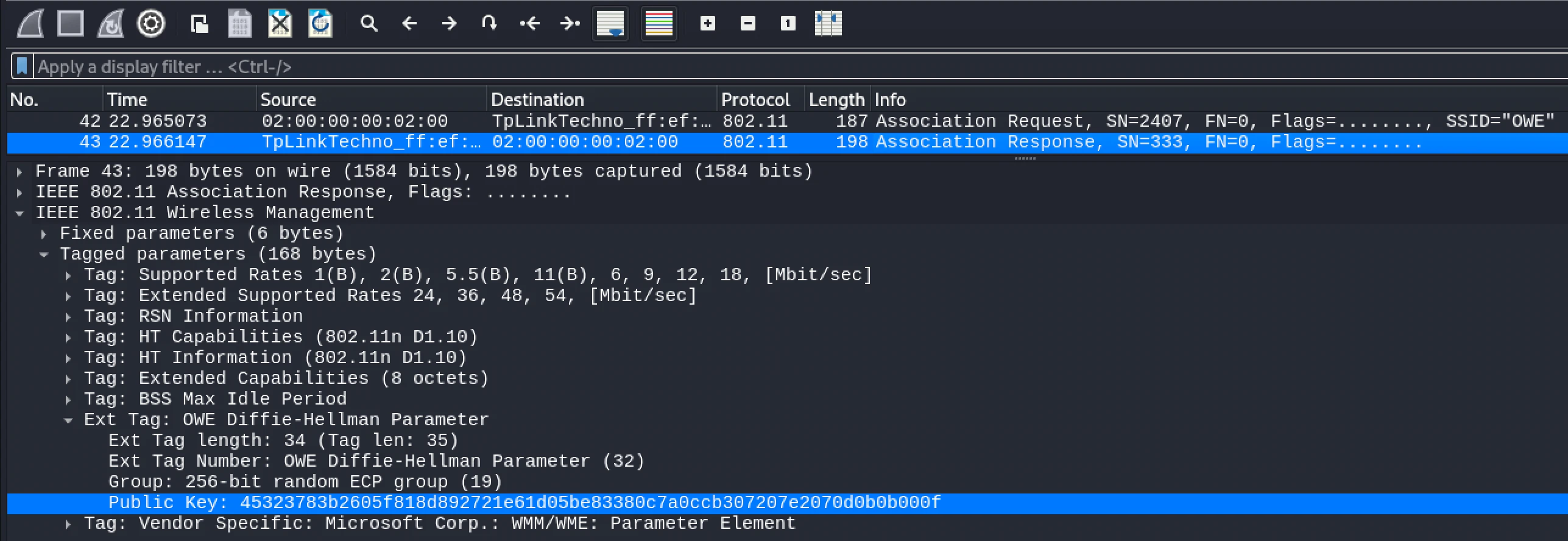 The AP responds with its own DH public key. Both sides now have everything they need to independently derive the same shared secret, without it ever being transmitted over the air.
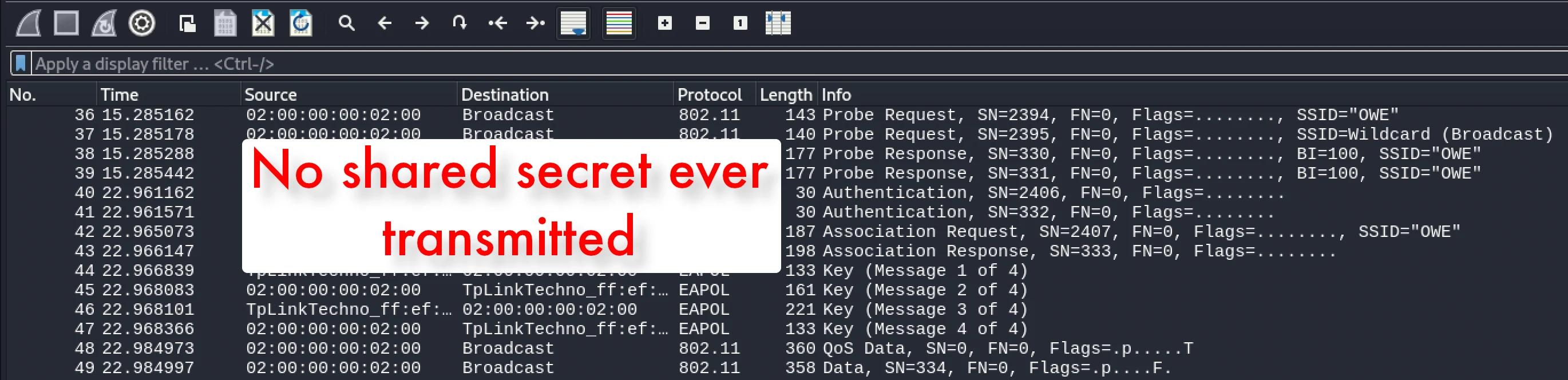 The full OWE connection flow. The DH exchange slots neatly into the existing association phase. The 4-way handshake then runs as normal, just with a PMK derived from the DH shared secret rather than a pre-shared passphrase.
The result: every client on the network gets its own per-session encryption key. Even if two users are on the same OWE network, they cannot decrypt each other’s traffic. That’s a meaningful step forward.
OWE also supports a transition mode, where the AP broadcasts both an OWE SSID and a traditional open SSID in parallel. Clients that support OWE connect to the encrypted version automatically; legacy devices fall back to open. It’s a backwards-compatible rollout option. Useful, but as we’ll cover, not without risk.
What Is OWE Designed For?
OWE is squarely aimed at public, guest, and hotspot Wi-Fi: coffee shops, hotels, airports, conference venues (yes, including hacker conferences), retail stores, and libraries. Anywhere a shared passphrase is operationally impractical. It’s also increasingly relevant to BYOD guest networks in enterprise environments, where the wireless layer is often left open or hidden behind a captive portal that does absolutely nothing for encryption.
The Advantages: What OWE Gets Right
Encryption with zero user friction. No passwords to distribute, rotate, or write on a sign. Users connect as they always have. The encryption just happens.
Per-session, per-client unique keys. Because the PMK is derived fresh via DH every session, you cannot passively capture and decrypt other users’ traffic, even if you’re sat on the same network. Compare that to WPA2-Personal, where knowing the PSK and capturing a handshake can expose other clients’ sessions. OWE is genuinely better in this specific regard.
No PSK to crack. There’s no pre-shared secret, no hash to run through hashcat, no wordlist to throw at it. That particular attack surface simply doesn’t exist.
Backwards compatible. Transition mode means organisations can deploy OWE without immediately breaking legacy devices. That’s a practical win for rollout.
The Limitations: Where OWE Falls Short
This is where we get real, because OWE has some significant gaps that matter a lot from a pentesting perspective.
No access point authentication. This is the big one. OWE encrypts the connection, but it does nothing to verify the AP is legitimate. There is no mutual authentication. A client has no way to confirm it’s talking to a genuine access point versus a rogue one. That means evil twin attacks still work. Stand up a rogue OWE AP with the same SSID, and the client happily completes the DH exchange and connects. The traffic is “encrypted” but to your access point. If you’ve been through my training, you’ll recognise this immediately: the encryption layer changed, the trust problem didn’t.
Deauth attacks still work. Management frame protection (PMF/802.11w) is recommended alongside OWE, but it’s not always deployed correctly. And as we know, “configured correctly” is a phrase that should always make your ears prick up on an engagement.
Transition mode is a downgrade path. While OWE is broadcasting alongside an open SSID, clients that get nudged off the OWE variant (via deauth and a well-positioned open network) fall back to unencrypted. The protection disappears without the user knowing anything changed.
It only protects the air interface. OWE encrypts traffic between the client and the AP. Once it leaves the AP, OWE provides zero protection. It’s not end-to-end encryption. HTTPS and TLS still matter on top of it.
Adoption has been slow. Despite being part of WPA3, real-world OWE deployment is still patchy. You’re more likely to still encounter traditional open networks on engagements, which means the classic passive sniffing attack surface is still very much alive.
If you’re working through wireless assessments and want a single reference that covers everything from adapter setup and monitor mode through to attacking WPA3 and enterprise networks, I put together a free Wi-Fi assessment cheatsheet. It’s the mind map I wish I’d had when I was starting out. Grab it at https://training.thexero.co.uk/wifi-cheatsheet, no fluff, just the commands and methodology you actually need on an engagement.
What This Means for Your Pentest
When you hit a guest or BYOD network scope, OWE changes the picture, but not as much as vendors would have you believe.
Passive sniffing is no longer your friend. Per-client session keys mean you can’t decrypt other clients’ traffic from monitor mode. That vector is closed on a legitimate OWE network.
The rogue AP is still very much on the table. No AP authentication means you can stand up an OWE rogue with the same SSID, clients will connect, and you see everything in plaintext on your end. The client’s device shows a lock icon. Your report gets a high finding.
Probe transition mode. If you spot an OWE network, check whether it’s running in transition mode. Identify the paired open SSID, hit the client with a targeted deauth, and you may have a downgrade path.
Don’t forget the endpoint. The infrastructure being secure doesn’t mean the devices on it are. Once a client is on your rogue network, you can see their outbound traffic, run Responder where conditions allow, and potentially capture credentials that work elsewhere: Microsoft 365, Azure AD, VPNs. I’ve seen that turn a wireless engagement into something far more interesting.
The Bottom Line
OWE is a genuine improvement over open Wi-Fi. Encrypting the air link without a password, with per-client session keys, is exactly the right design for public hotspots. It closes the passive sniffing attack surface. That matters.
But it doesn’t authenticate the access point. It doesn’t stop rogue APs. It doesn’t prevent downgrade attacks. And it won’t protect anything from someone who understands how wireless trust actually works.
Treat OWE as a step forward, not a barrier. Understand what the protocol does and doesn’t guarantee, then work the angles it leaves open. That’s how good wireless pentesters think.
Wi-Fi isn’t a black art. It just rewards the people who take the time to understand it properly.
If you want to go beyond posts like this and actually build that understanding from the ground up, that’s exactly what my WiFi: Novice to Professional program is built for. We go from the fundamentals of how 802.11 actually works all the way through to WPA3, enterprise attacks, and wireless pivoting with real labs, not just theory.
It’s the same material I’ve taught at OWASP, at conferences, and to professional pentest teams. If wireless keeps coming up in your engagements and you want to stop guessing and start knowing, come and take a look.
